Stop Renting Creativity.
Start Owning It.
Join the Bootcamp →
Outsourcing vs. Owning the Capability
Two ways to handle video. One keeps costing you. The other pays for itself.
- You pay $500 - $2k per video: the Agency Tax.
- Slow turnaround (the Waiting Game): By the time the agency delivers, the moment you wanted to capture has passed.
- Budget pressure: You end up posting less because every video costs money. Your content calendar shrinks around your wallet.
- Revision Hell: Endless rounds of "not quite" because the people executing don't live your brand.
- You produce unlimited assets for $0 marginal cost.
- You make edits in 15 minutes internally.
- Post more, spend nothing extra: Once you can make videos yourself, there's no per-video cost. You can publish as often as you want.
How We Install the Engine
(And Why It's Different)
Most courses teach effects and tricks. We install a repeatable system: how to set up, build, and ship videos your team can produce again and again.
Set It Up Once
We don't start with fancy effects. We start with files, folders and a master project set up properly, so nothing breaks as you scale.
Build Without the Guesswork
Shortcuts, safe zones and prompt recipes replace the decisions you shouldn't have to make. Swap in new footage and text, don't start from scratch.
Ship Without a Re-render
Licensing rules, a pre-flight check and ready-made export settings catch the expensive mistakes before you hit Render, not after the client sees it.
Each stage arrives as something you can hold. Nine tools, three per stage, handed out week by week, yours to keep.
The 6-Week Curriculum
Explore the weekly Bootcamp roadmap. One module per week, 3 to 5 hours each, every week shipping a finished asset.
Infrastructure & "The First Win"
Week 1
Foundations
Your First Video & The Draft Protocol
What We Cover
- The "One-Click" Setup: Installing the LearnAE Folder Generator script to automate project organization.
- The Interface Diet: Hiding 90% of the buttons you don't need so you can focus on the 5 that matter.
- The "Draft" Protocol: How to export a "WhatsApp Quality" proof in seconds so you can get approvals fast.
The Infrastructure Install. Get the software running and export your first video immediately.
Week 2
Mechanics
Making Things Move (And Look Good)
What We Cover
- Asset Ingestion: Dropping your Vector Logos and Brand Fonts into the supplied container's placeholder slots, then locking the file "Read-Only" so every future project starts as a Save As.
- Physics 101: Moving beyond "robotic" linear motion using the Graph Editor to make movement feel expensive.
Take the Master-Start container we give you and make it permanently yours, so you never have to hunt for a hex code or logo again.
Building The Asset Library
Week 3
The Container
A Reusable Template for Social Videos
What We Cover
- The Omni-Channel Canvas: Setting up one project that updates LinkedIn and TikTok formats simultaneously.
- Drop Zone Architecture: Creating "Smart placeholders" to swap footage instantaneously.
- The "Cookie Cutter": Using Track Mattes to create perfect crops.
Build the reusable frame that turns raw phone footage into a branded company asset.
Week 4
Force Multiplier
Automating Repetitive Work
What We Cover
- Parenting Systems: Linking text boxes to headlines for auto-resizing backgrounds.
- The AI-Assistant Workflow: Using ChatGPT to write complex animation expressions for you.
Use code to make things move automatically, without learning how to code.
Polish & Production
Week 5
Accelerator
Using Pro Templates Without Breaking Things
What We Cover
- The "Template Surgery" Protocol: Importing Envato templates into your clean rig without breaking it.
- The External Ecosystem: Installing free extensions like Animation Composer.
- The Global Polish: Using Adjustment Layers for instant "looks."
- The Sound Layer: Syncing sound effects to your motion so videos feel finished, not silent.
Now that you know the rules, we teach you how to break them using professional accelerators.
Week 6
The Launch
Exporting, Saving & Reusing Your Work
What We Cover
- The "Pre-Flight" Checklist: Ensuring no errors before rendering.
- The Export Presets Pack: Six one-click presets covering delivery, review, overlays and archiving.
- The Archive Protocol: Packaging projects and masters for future-proofing.
Ship the product and protect the asset.
What's Included
A nine-part Starter Kit you keep for good, built to remove the setup, the guesswork and the re-renders. Each piece arrives in the week you need it. Tier 2 adds the Toolkit, a tenth piece that lives inside After Effects itself.
Set it up once
The setup tax, paid for you. Nobody loses their first week to folders and preferences.
Pre-Course Setup Guide
Software, fonts, autosave and cache configured before you ever open a project. Step by step, so setup day isn't yours to solve.
Pre-CourseProject Folder Generator
A one-click script that builds the same clean, ISO-standard folder tree every time. "Media Offline" stops happening to you.
Week 1The Master-Start Container
A pre-built project skeleton: bins colour-coded, comp settings locked, empty slots waiting for your logo, colours and fonts.
Week 2Build without the guesswork
The reference material that removes the decisions you shouldn't have to make.
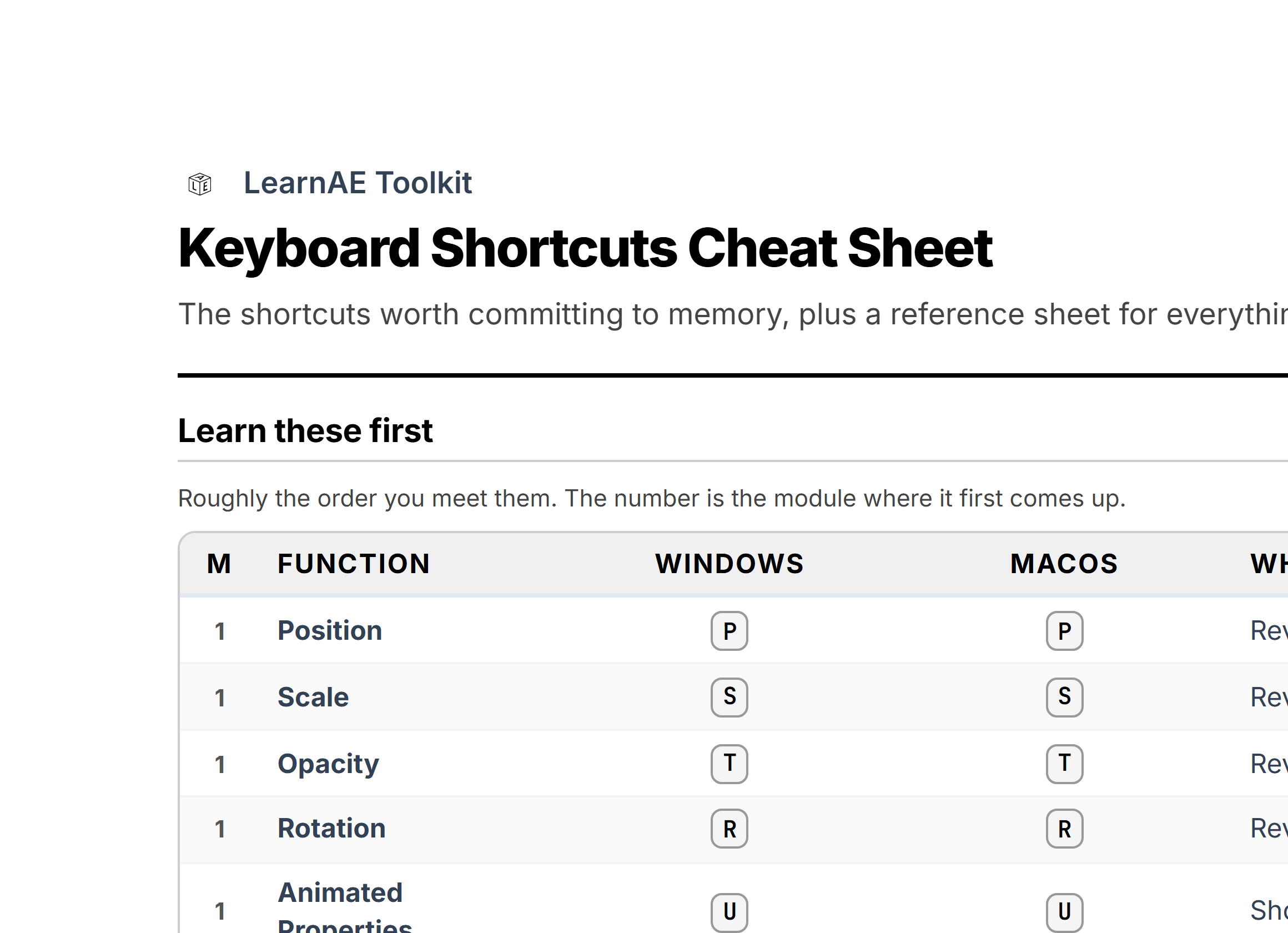
Shortcuts Cheat Sheet
A printable cheat sheet: the 22 shortcuts worth committing to memory, plus a reference sheet for everything else. Pin it by the desk, learn it in a week.
Week 1Social UI Safe Zone Overlay
A drop-in guide layer mapping the dead zones on TikTok, Reels and Shorts, so your headline never lands under a caption bar.
Week 3AI Expression Prompt Library
Copy-paste prompt recipes for loops, wiggles, counters and auto-resizing boxes. The code writes itself, you stay the director.
Week 4Ship without a re-render
The last mile, where errors are most expensive and most avoidable.
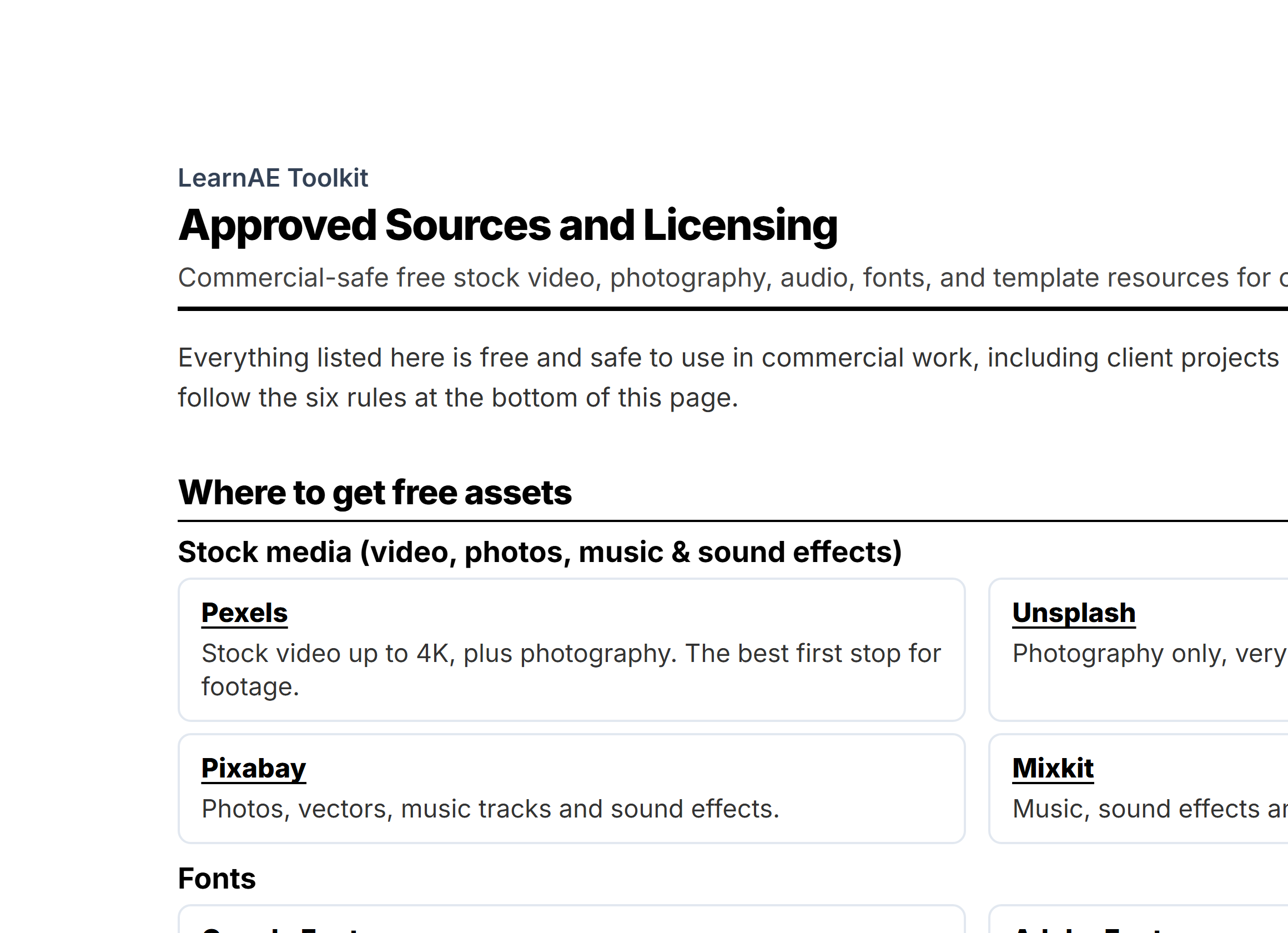
Approved Sources & Licensing
The safe list of stock video, image and audio sources, plus the commercial-use rules for free templates. Closes a liability gap.
Week 1The Pre-Flight Checklist
A tick-through checklist you can run on screen or print, so projects get validated and errors get caught before you hit "Render."
Week 6Export Presets Pack
Six one-click presets: web delivery, review copies, transparent overlays, GIFs and an archive master. The right codec every time.
Week 6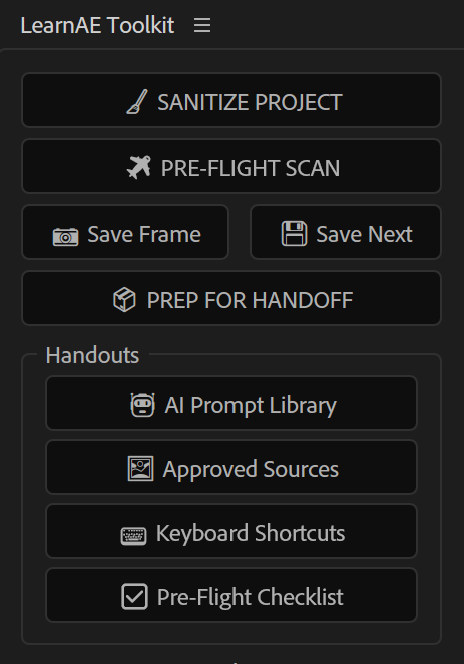
A Small Panel That Lives Inside After Effects
Docked right in your workspace. A few buttons that handle the fiddly jobs so you never leave the app.
Organise
Sort any project into clean folders. One click.
Check
Scan for muted audio, preview settings and missing fonts before you export.
Ship
Package for handoff and version-save without overwriting.
Quick access
Save a frame, open your reference sheets. No hunting.
Set up for you at the start, with a short walkthrough video.
Who Is This For?
Founders & Solo Operators
Produce high-volume social content yourself, or hand it to a junior later without the quality dropping.
You want Tier 1: Owner-Producer
Managers & Teams
Train your team to produce agency-quality video in-house. Own the source files, the speed and the budget.
You want Tier 2: In-House Engine
Executives & Departments
Buying for a department, not a team. We audit, architect and staff the studio, then run it with you.
You want Tier 3: Executive Studio
Join The Bootcamp
Invest once. Own the capability forever.
| Feature | Tier 1: Owner-Producer |
Tier 2: In-House Engine |
TIER 3: EXECUTIVE STUDIO |
|---|---|---|---|
| Core Training 6-Week Implementation Roadmap |
Includes Everything
in Tier 1 & Tier 2
(2 Weeks) |
||
| Implementation Support Curriculum Q&A via Skool |
|||
| The 9-Part Starter Kit
Every piece listed above |
|||
| LearnAE Pro Kit Toolkit panel, built into After Effects |
|||
| Commercial Use Client work & multiple brands |
|||
| Kickoff Strategy Call 45 min, before Week 1 starts |
|||
| Expert Reviews Audits, 1-to-1 & sign-off |
|||
| Manager Dashboard Track team progress & ROI |
|||
| 6 Months Priority Support Front of the queue |
|||
| Community Access Networking & peer support |
2 months | 6 months | |
| Included Seats Total Logins |
1 | 3 + 1 | |
| Price One-Time Investment |
$1,495
|
$2,995 | $9,995 |
The "Ship It" Guarantee
Follow the 6-week roadmap and use the templates. If you still can't produce a professional brand video within 30 days of finishing, our team steps in and works with you until it ships, and if it comes to it, we'll produce the asset for you ourselves.
Frequently Asked Questions
When does it start?
From there it's one module a week for six weeks, at 3 to 5 hours each. Q&A sessions run on the community calendar and you're welcome at any of them, whichever week you happen to be on. So you're never waiting on a group, and never behind one either.
Do I need prior video editing experience?
How much time does it take to implement?
Are there any hidden costs or software requirements?
- Active Adobe After Effects subscription (approximately $25/month), version 2024 or newer. If you already subscribe, updating is free and takes a few minutes in the Creative Cloud app.
- A capable computer (recommended: at least 16GB of RAM, modern processor, dedicated GPU)
One thing worth knowing up front: your community access runs for 2 months on Tier 1 and 6 months on Tier 2, and everything you're charged for is covered by that. If you want to stay in the group after your window ends, you'll be able to extend it, but nothing about the bootcamp, your templates or your lifetime course access depends on it.
I want my team to do this, not me. Which tier is right?
Your team's work gets checked too. You have an allowance of async video audits, where we review a learner's project file and send back a recorded critique: 5 per company, roughly 10 minutes each with a 48-hour turnaround. Then at the end we run our "Greenlight" pass: you nominate one final project, and we sign off on its layer structure, render efficiency and organisation. That one is automatic and it doesn't use up an audit.
What actually makes Tier 2 different, technically?
One exception, right now. Three of those tools are brand new, and while they are in beta we are including the panel with Tier 1 as well. It goes back to being Tier 2 only once the beta ends. If you have it by then, it stays yours.
How do I know if I qualify for the Founder's Grant?
- Your company must have fewer than five employees
- You (the founder) must be the one actually taking the bootcamp and doing the video work yourself
- You commit to actively engaging with the curriculum throughout all 6 modules to ensure the system is successfully implemented